When tracking sales data across Facebook Ads, GA, and the store Dashboard, there may be cases where tracking platforms record a higher number of purchases or Thank you page visits than the actual number of orders in the system.
To help sellers review these cases more clearly, the system has added the Order Received Visitors feature at /admin/conversion-analytics.
This feature records visits to the Order Received / Thank you page, helping distinguish between valid visits related to actual orders created on the day and revisit traffic from users who return to an old page.
How Order Received Visitors works
At /admin/conversion-analytics, the system records visits to the Order Received / Thank you page and displays information such as:
Path
Order Number
Referer (Domain)
Query String
Country
Visit Date
In addition, the system classifies visits into:
Valid Order Count
Invalid Order Count
Visits with Referer = Direct/Unknown are usually considered invalid, as they often happen when a customer has already visited the page before and later returns by:
reopening an old browser tab
using a saved bookmark
refreshing the page
returning to review the order at another time
On the other hand, visits with other referer sources are usually more likely to reflect actual orders placed on that day.
For this reason, the number shown on the Thank you page or in tracking tools may be higher than the Dashboard, but this does not mean the store has lost any orders.
How to check in Conversion Analytics
Step 1 – Open the Conversion Analytics page
To review the data, you can open the Conversion Analytics page in one of the following ways:
Access the page directly via
/admin/conversion-analyticsOr from the Dashboard, in the Store conversion rate section, click the View conversion analytics icon
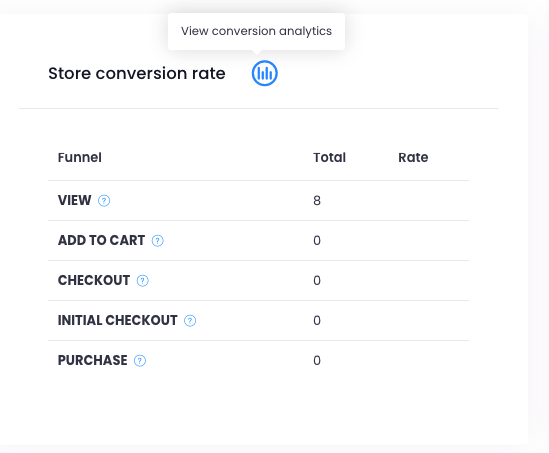
After opening the page successfully, you will see the Order Received Visitors section, which tracks visits to the Order Received / Thank you page.
Step 2 – Check Valid Order Count and Invalid Order Count
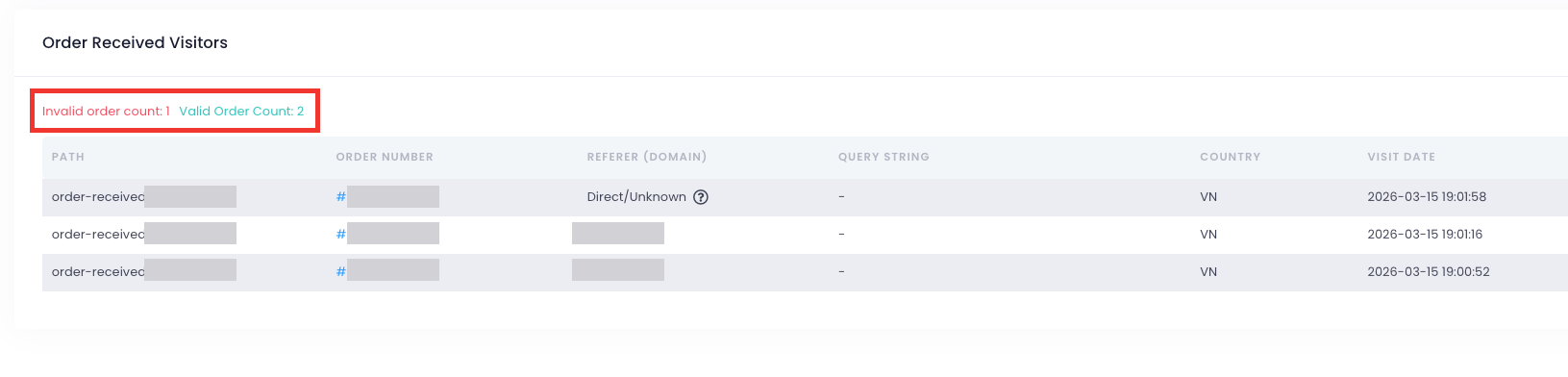
At the top of the table, the system displays:
Valid Order Count: visits that are more likely to be valid for comparison with actual orders
Invalid Order Count: visits that are considered invalid, usually because the customer revisited the page after already visiting it earlier
These are important indicators for understanding why the number of Thank you page visits or purchase events in tracking tools may be higher than the actual number of orders shown in the Dashboard.
Step 3 – Review each row in detail
In the Order Received Visitors table, the system displays information such as:
Path
Order Number
Referer (Domain)
Query String
Country
Visit Date
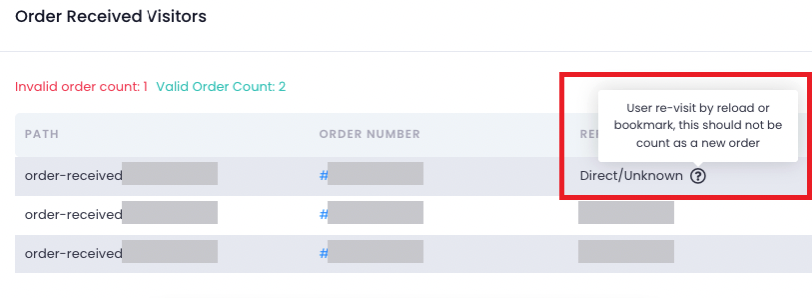
In addition to the information shown directly in the table, you can hover over the icon on each row to see more detailed explanations for the corresponding visit.
For example, for rows with Referer = Direct/Unknown, hovering over the icon will show a note explaining that the customer revisited the page by reloading it, using a bookmark, or reopening an old tab, so that visit should not be counted as a new order.
This helps explain why the Thank you page or tracking tools may record additional visits while the Dashboard does not show any increase in order count.
Step 4 – Compare with Dashboard and tracking data
After reviewing the list in Order Received Visitors, you can compare it with the data shown in the Dashboard, Facebook Ads, or Google Analytics to better understand the reason for any mismatch.
When comparing the data, please keep in mind:
Valid Order Count usually reflects visits that are more closely related to valid order activity on that day
Invalid Order Count usually includes customers revisiting the Order Received / Thank you page by reloading it, using a bookmark, or reopening an old tab, so these should not be treated as new orders
For this reason, tracking tools may show higher numbers than the Dashboard, but this does not mean the store has lost any orders
If the number of sales in Ads or Thank you page visits is higher than the number of orders in the store, you can use this section to determine whether those visits are valid or simply revisits of the same order.
Example
For example, the Order Received Visitors page may show one additional visit to the Thank you page today.
However, the order linked to that visit may have already been created in the system earlier. The customer may have simply returned to the order page using an old tab or bookmark, so the tracking system records another visit while the Dashboard does not add a new order.
In this case, the difference comes from how tracking data is recorded, not because the store has lost an order.
Summary
The Order Received Visitors feature was added to help you compare and better understand the differences between:
tracking data in Ads/GA
visits to the Thank you page
actual paid orders in the store
In most cases, differences in numbers come from how tracking platforms record data.
Please monitor /admin/conversion-analytics whenever you notice that the data across platforms does not match. If you need a more detailed review, you can send the time range and the figures from Ads/GA and Dashboard so the support team can check and assist more quickly.
We hope this guide helps you review and compare sales data more easily while managing your store. If you need further assistance, please contact the support team for a detailed check.
Was this article helpful?
That’s Great!
Thank you for your feedback
Sorry! We couldn't be helpful
Thank you for your feedback
Feedback sent
We appreciate your effort and will try to fix the article